Stop doomscrolling today
Turn TikTok Cravings Into Workouts
Every unlock requires effort, so you scroll less, focus more, and feel in control again.
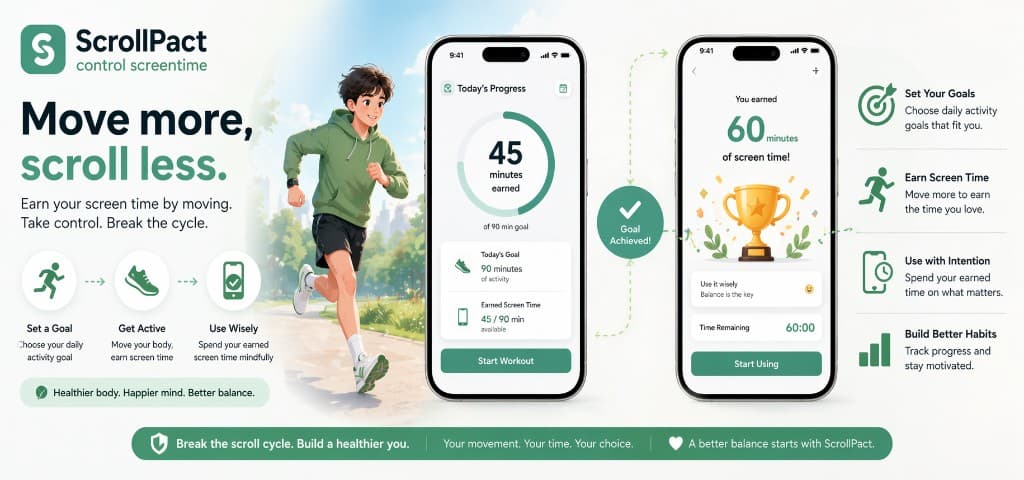
How It Works
1. Block Addictive Apps
Add TikTok, YouTube, or any app you want to control.
2. Complete Exercise Tasks
Earn screen time by completing push-ups, squats, planks, or running goals.
3. Unlock & Use
Use your apps guilt-free.
Why You Can’t Stop Scrolling
Apps like TikTok are designed to be addictive. Willpower alone doesn’t work. You need friction.
Learn the science behind friction - how to reduce screen time
Read practical guides and proven strategies to reduce addictive scrolling.
Take Back Control Today
Install the app and turn mindless scrolling into mindful action.
Download ScrollPact control screentimeHow to Reduce Screen Time Without Relying on Willpower
Most people searching for how to reduce screen time already know they scroll too much. The problem is not awareness — it is access. TikTok, YouTube Shorts, Instagram Reels, and similar apps are engineered for instant reward.
ScrollPact uses friction before reward. Instead of blocking apps permanently or setting timers you ignore, you earn screen time by completing push-ups, squats, planks, or running.
If your goal is long-term behavior change, you need a system that works on bad days too. That is what ScrollPact is designed for.
Why Screen Time Limits Usually Fail
1. Limits are easy to override
Built-in screen time settings can be changed in seconds when cravings spike.
2. Apps stay one tap away
Addictive apps on your home screen trigger automatic opens before you consciously decide.
3. Willpower fades under stress
After work, poor sleep, or boredom, discipline-based systems collapse.
4. No replacement behavior
Deleting apps helps briefly, but friction plus physical effort creates a stronger alternative loop.
A Practical Framework to Stop TikTok Addiction
To stop TikTok addiction, focus on changing the cost of access. ScrollPact lets you choose which apps require effort before unlock and how much exercise earns how many minutes.
- Identify your top 1–3 trigger apps (often TikTok, YouTube, Instagram).
- Set a realistic exercise rule: for example, 10 push-ups = 10 minutes of access.
- Track daily unlock attempts and total earned screen time.
- Adjust difficulty weekly so the system stays challenging but achievable.
- Pair the rule with sleep, focus, or study blocks for compounding benefits.
Read our dedicated guides: How to Reduce Screen Time, How to Delete TikTok, and Stop TikTok Addiction.
Frequently Asked Questions About Screen Time Control
- What is the best way to reduce screen time?
- The most sustainable method is friction-based access control: make opening addictive apps require deliberate action, such as exercise.
- Does deleting TikTok actually help?
- Deleting TikTok is a strong first step, but combining deletion with ongoing friction rules improves long-term consistency.
- Can exercise really reduce phone addiction?
- Yes. Physical effort introduces delay and cost before dopamine-heavy scrolling.
- Is ScrollPact only for TikTok?
- No. You can apply unlock rules to TikTok, YouTube, Instagram, games, and any app you choose.
- How is ScrollPact different from normal app blockers?
- Traditional blockers rely on hard bans that users override. ScrollPact uses earned access through movement tasks.